
Troubleshoot logging in
How to log in
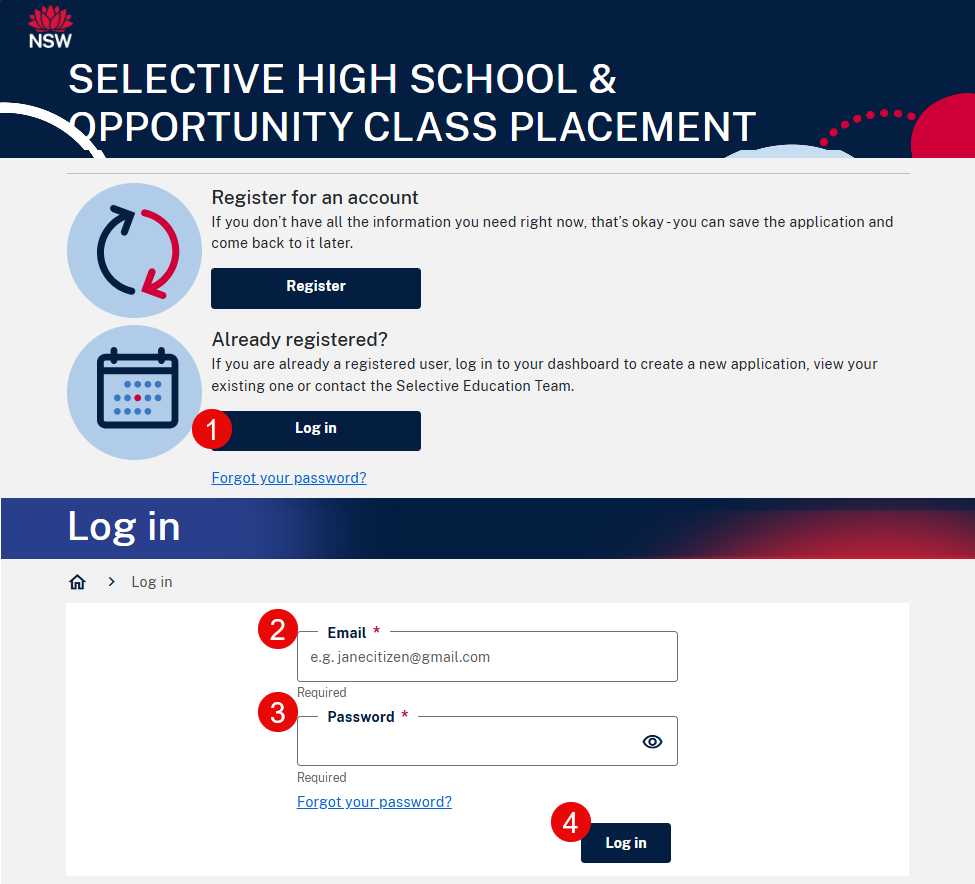
- Go to the application website and select Log in from the lower section of the page.
- Enter your email address (that you used when registering for your online application).
- Enter your password.
- Select Log in.
- A confirmation code will be sent to your email address.
You may need to wait up to 10 minutes for the code to be received. The code is valid for 15 minutes. Check your Spam or Junk folders also. Please do not keep clicking on Resend confirmation code otherwise your code will get out of sync. - Enter the code in the space provided and select Confirm.
Troubleshooting
Forgotten password
- If you have forgotten your password, select Forgot your password to be sent an email to reset it (link is valid 2 hours).
If you experience difficulty resetting a new password, ensure you have entered 14 characters which includes capital and uppercase letters, a number and a special character. - Check your Spam or Junk folder.
Wrong confirmation code
- If the wrong confirmation code is entered an error will appear. You will have 3 attempts to enter a valid confirmation code.
- You may also select Resend confirmation code to receive a new confirmation code (via email) to enter.
- If you have entered 3 wrong codes, you will need to go back to the login page and restart the log in process (each code will remain valid for 15 minutes).
Need more help?
If you still can’t log in, please email: set@det.nsw.edu.au.